HOW TO REGISTER
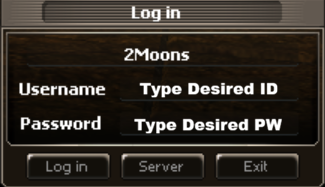
Accounts are created inside the game client — there is no separate sign-up form. Just type your desired ID and password on the Log In screen and they will be saved as your account.
Write your ID & password down!
Account recovery isn't available yet — if you lose your credentials we cannot restore them.
- 1Download & install the client
Grab the 2Moons Legacy A2 client from the Download page and install it.
- 2Open the game and reach the Log In window
Launch the game — you'll see the Log In dialog with ID and PW fields.
- 3Type a desired ID and password
In the ID field type your desired account ID, in the PW field type your desired password, then press Log In. If the ID is free, the account is created and you're logged in.
- 4Save your credentials somewhere safe
Note your ID and password in a password manager before you log out. There is no recovery yet.